 BoloQuote
Use your phone. Open the link below in Safari (iPhone) or Chrome (Android). To keep it like an app, add it to your home screen: on iPhone tap the Share button, then Add to Home Screen. On Android tap the ⋮ menu, then Add to Home screen.
ਫ਼ੋਨ 'ਤੇ ਵਰਤੋ। ਹੇਠਲਾ ਲਿੰਕ Safari (iPhone) ਜਾਂ Chrome (Android) ਵਿੱਚ ਖੋਲ੍ਹੋ। ਐਪ ਵਾਂਗ ਰੱਖਣ ਲਈ ਇਸਨੂੰ ਹੋਮ ਸਕਰੀਨ 'ਤੇ ਲਾਓ: iPhone 'ਤੇ Share ਬਟਨ ਦਬਾ ਕੇ Add to Home Screen ਚੁਣੋ। Android 'ਤੇ ⋮ ਮੀਨੂ ਦਬਾ ਕੇ Add to Home screen ਚੁਣੋ।
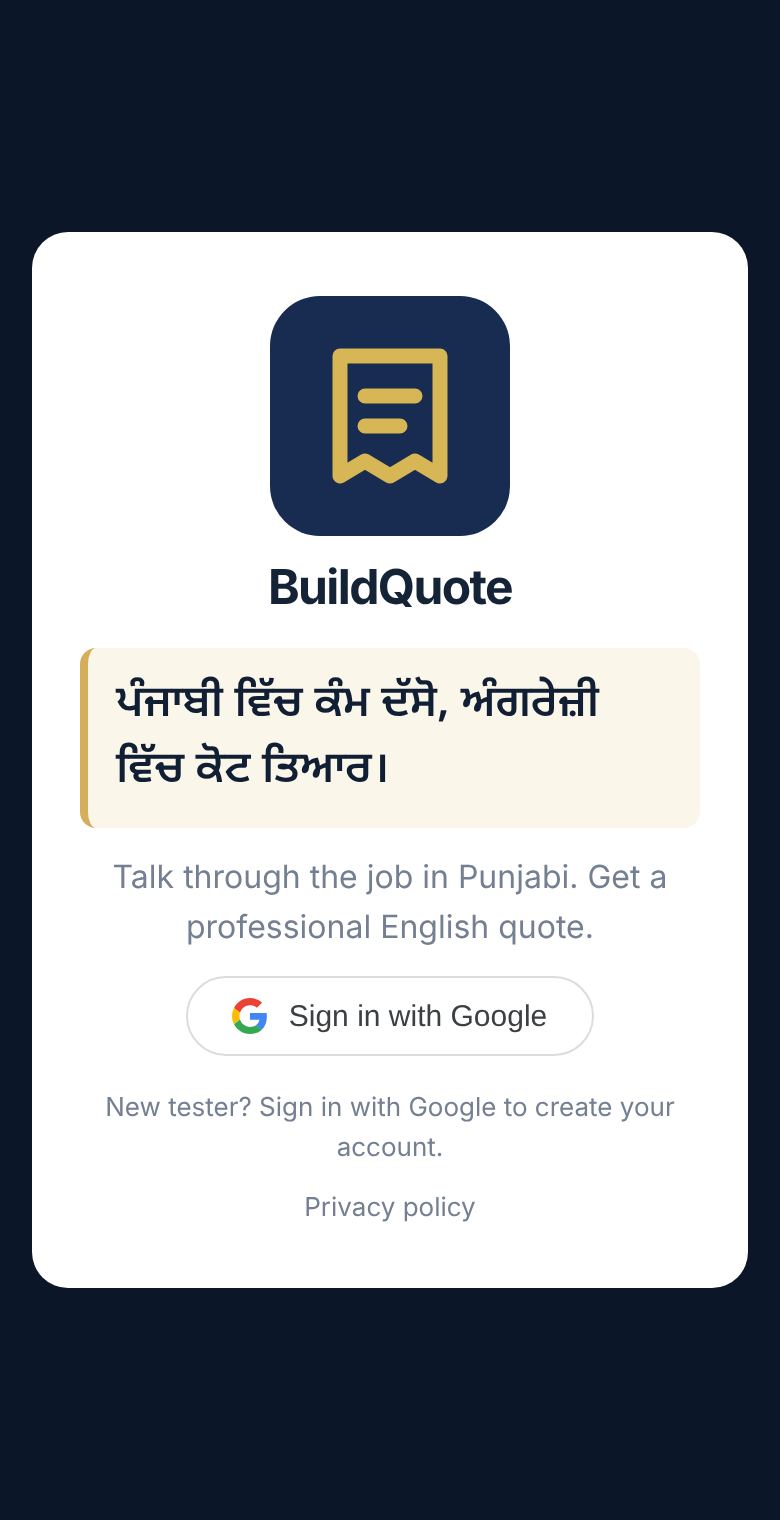
1Sign in with Google or email
Tap Sign in with Google and pick your Google account. BoloQuote never sees your password. No Google account? Tap Sign in with email instead, type any email you use, and enter the 6-digit code we email you (check junk mail if it doesn't arrive).
Google ਨਾਲ ਸਾਈਨ ਇਨ ਕਰੋ
Sign in with Google ਦਬਾਓ ਅਤੇ ਆਪਣਾ Google ਖਾਤਾ ਚੁਣੋ। BoloQuote ਨੂੰ ਤੁਹਾਡਾ ਪਾਸਵਰਡ ਨਹੀਂ ਦਿਸਦਾ। Google ਖਾਤਾ ਨਹੀਂ ਹੈ? Sign in with email instead ਦਬਾਓ, ਆਪਣੀ ਕੋਈ ਵੀ ਈਮੇਲ ਲਿਖੋ, ਅਤੇ ਈਮੇਲ ਵਿੱਚ ਆਇਆ 6 ਅੰਕਾਂ ਦਾ ਕੋਡ ਭਰੋ (ਜੇ ਨਾ ਆਵੇ ਤਾਂ junk/spam ਫੋਲਡਰ ਵੇਖੋ)।
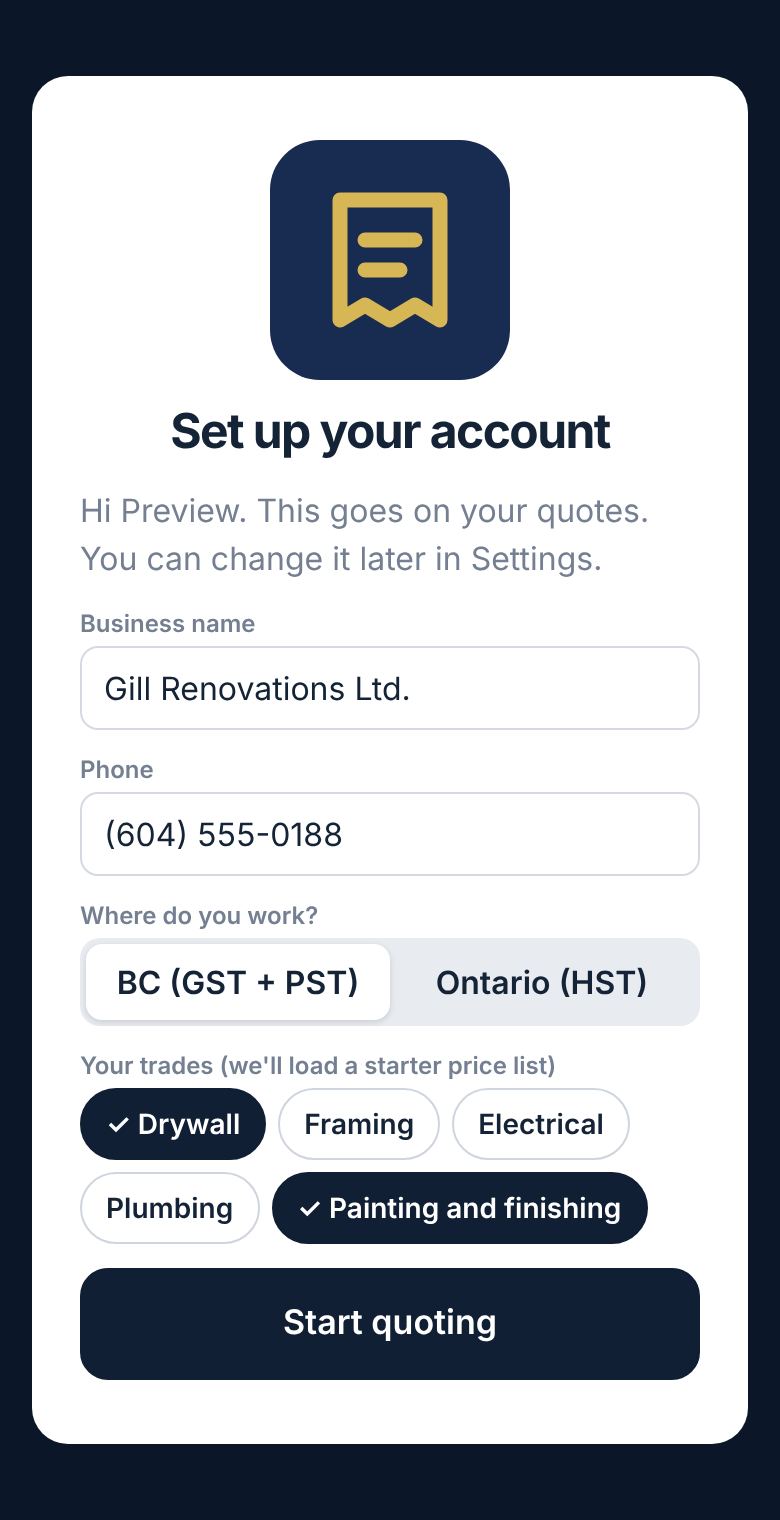
2Set up your business
Enter your business name, phone, province (BC, Alberta, Manitoba or Ontario), the language you talk in, and the trades you do. Choose Punjabi, Mandarin, Cantonese, Farsi, Tagalog or English. Punjabi is the most tested; the others are in beta, so check the numbers before sending. You can change the language for any single quote. This goes on every quote. Tap Start quoting.
ਆਪਣੇ ਕਾਰੋਬਾਰ ਦੀ ਜਾਣਕਾਰੀ ਭਰੋ
ਕਾਰੋਬਾਰ ਦਾ ਨਾਮ, ਫ਼ੋਨ, ਸੂਬਾ (BC, Alberta, Manitoba ਜਾਂ Ontario), ਤੁਸੀਂ ਕਿਹੜੀ ਬੋਲੀ ਬੋਲਦੇ ਹੋ (ਪੰਜਾਬੀ, ਜਾਂ ਨਵੀਆਂ: Mandarin, Cantonese, Farsi, Tagalog), ਅਤੇ ਤੁਸੀਂ ਕਿਹੜਾ ਕੰਮ ਕਰਦੇ ਹੋ, ਇਹ ਭਰੋ। ਇਹ ਹਰ ਕੋਟ 'ਤੇ ਛਪੇਗਾ। ਫਿਰ Start quoting ਦਬਾਓ।
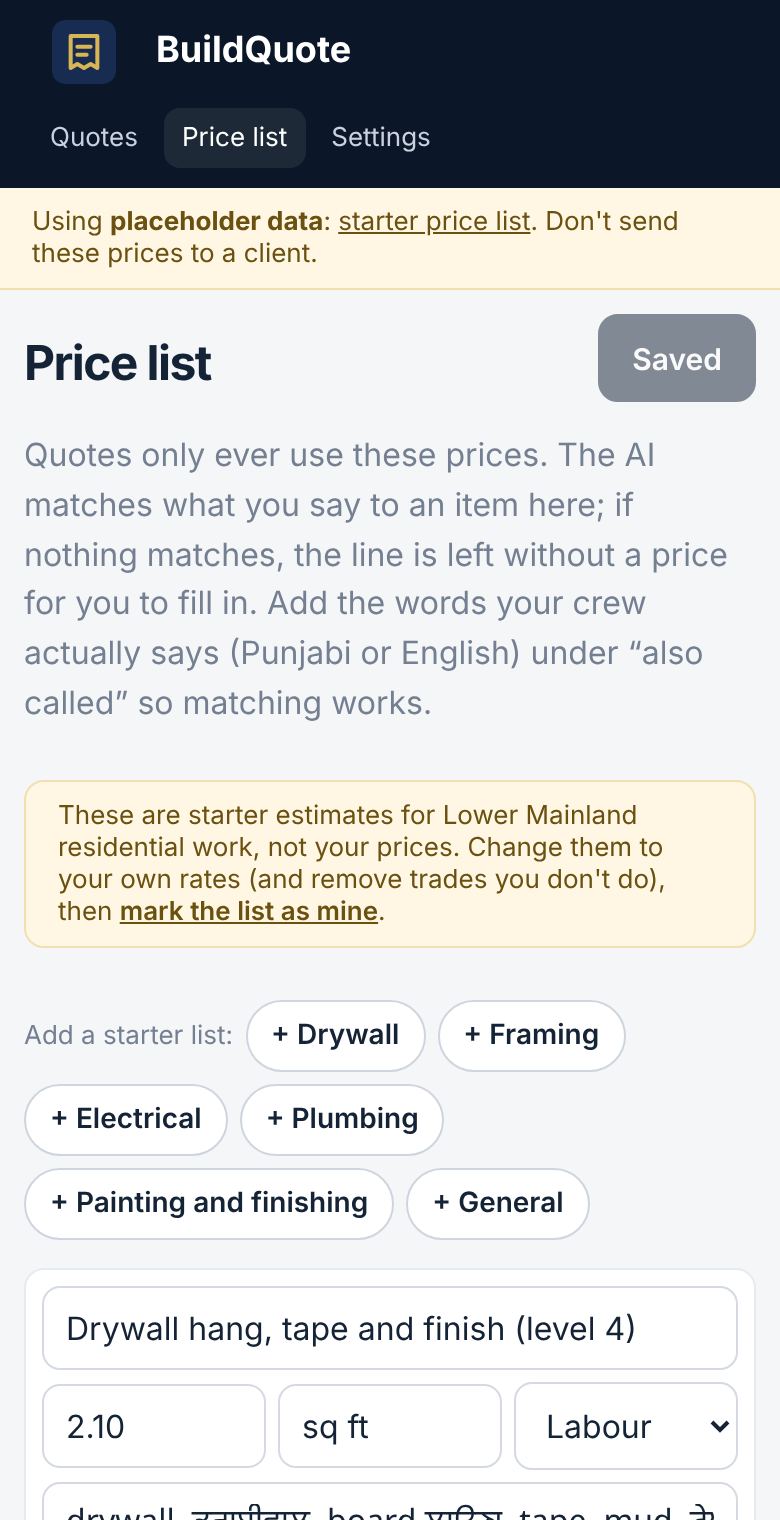
3Put in your own prices
Open Price list. It starts with sample prices, which are not yours. Change them to your own rates, delete jobs you don't do, and under "also called" add the words your crew actually says. Then tap mark the list as mine and Save price list.
The app never makes up a price. It only uses this list. If something you say isn't on the list, that line comes out with no price for you to fill in. For common jobs it may instead show a rough standard estimate, marked ~. Those are our guesses, not your prices: the quote can't be sent until you confirm each one or type your own price.
ਆਪਣੇ ਰੇਟ ਪਾਓ
Price list ਖੋਲ੍ਹੋ। ਸ਼ੁਰੂ ਵਿੱਚ ਨਮੂਨੇ ਦੇ ਰੇਟ ਲੱਗੇ ਹੁੰਦੇ ਹਨ, ਇਹ ਤੁਹਾਡੇ ਨਹੀਂ ਹਨ। ਇਹਨਾਂ ਨੂੰ ਆਪਣੇ ਰੇਟਾਂ ਨਾਲ ਬਦਲੋ, ਜੋ ਕੰਮ ਤੁਸੀਂ ਨਹੀਂ ਕਰਦੇ ਉਹ ਹਟਾ ਦਿਓ, ਅਤੇ "also called" ਵਿੱਚ ਉਹ ਸ਼ਬਦ ਲਿਖੋ ਜੋ ਤੁਹਾਡੀ ਟੀਮ ਦੇ ਮੁੰਡੇ ਬੋਲਦੇ ਹਨ। ਫਿਰ mark the list as mine ਅਤੇ Save price list ਦਬਾਓ।
ਐਪ ਕਦੇ ਵੀ ਆਪਣੇ ਕੋਲੋਂ ਰੇਟ ਨਹੀਂ ਬਣਾਉਂਦੀ, ਸਿਰਫ਼ ਤੁਹਾਡੀ ਲਿਸਟ ਵਰਤਦੀ ਹੈ। ਜੇ ਕੋਈ ਕੰਮ ਲਿਸਟ ਵਿੱਚ ਨਹੀਂ, ਤਾਂ ਉਹ ਲਾਈਨ ਬਿਨਾਂ ਰੇਟ ਦੇ ਆਵੇਗੀ ਅਤੇ ਰੇਟ ਤੁਸੀਂ ਆਪ ਭਰਨਾ ਹੈ।
Also check Settings: add your logo, your usual deposit % and your terms, and tap Turn on notifications so your phone tells you the moment a client signs. On iPhone this works once BoloQuote is on your Home Screen.
ਨਾਲ ਹੀ Settings ਵਿੱਚ ਆਪਣਾ ਲੋਗੋ, ਆਮ ਡਿਪਾਜ਼ਿਟ % ਅਤੇ ਸ਼ਰਤਾਂ (terms) ਭਰ ਦਿਓ, ਅਤੇ Turn on notifications ਦਬਾਓ ਤਾਂ ਜੋ ਕਲਾਇੰਟ ਦੇ ਦਸਤਖ਼ਤ ਕਰਦੇ ਹੀ ਤੁਹਾਡੇ ਫ਼ੋਨ 'ਤੇ ਸੂਚਨਾ ਆ ਜਾਵੇ। iPhone 'ਤੇ ਇਹ BoloQuote ਨੂੰ ਹੋਮ ਸਕਰੀਨ 'ਤੇ ਲਾਉਣ ਤੋਂ ਬਾਅਦ ਹੀ ਚੱਲਦਾ ਹੈ।
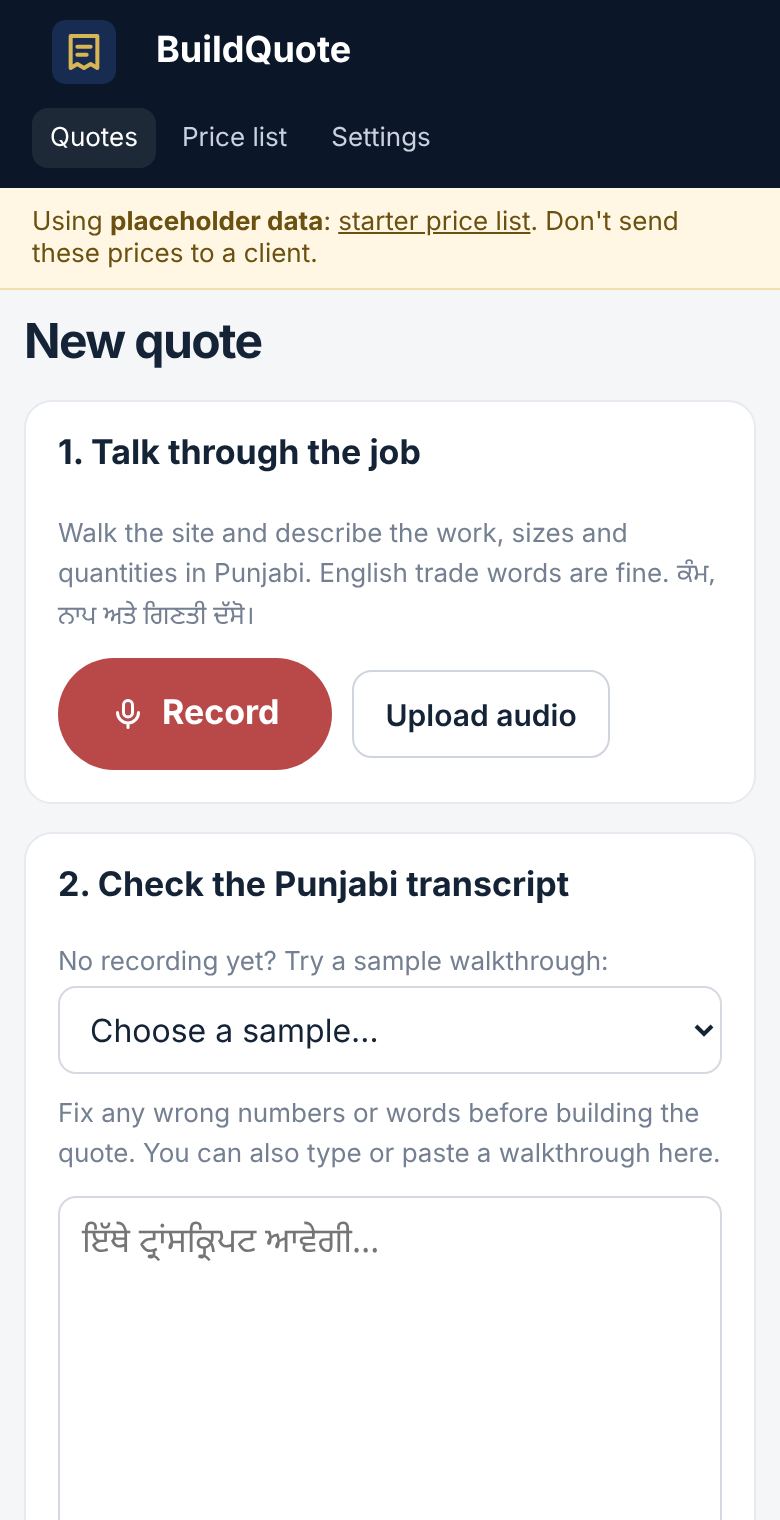
4Record the job in your language
On Quotes, tap New quote, then Record. Walk the site and talk the way you would to your crew:
- the client's name and the job address
- each job, with sizes and quantities ("two bedrooms, 12 by 12, drywall and paint")
English trade words are fine. Tap Stop, then Transcribe.
ਪੰਜਾਬੀ ਵਿੱਚ ਕੰਮ ਰਿਕਾਰਡ ਕਰੋ
Quotes ਵਿੱਚ New quote ਦਬਾਓ, ਫਿਰ Record। ਸਾਈਟ 'ਤੇ ਤੁਰਦੇ ਹੋਏ ਉਵੇਂ ਹੀ ਦੱਸੋ ਜਿਵੇਂ ਆਪਣੀ ਟੀਮ ਦੇ ਮੁੰਡਿਆਂ ਨੂੰ ਦੱਸਦੇ ਹੋ:
- ਕਲਾਇੰਟ ਦਾ ਨਾਮ ਅਤੇ ਕੰਮ ਵਾਲੀ ਥਾਂ ਦਾ ਪਤਾ
- ਹਰ ਕੰਮ, ਨਾਪ ਅਤੇ ਗਿਣਤੀ ਸਮੇਤ ("ਦੋ ਬੈੱਡਰੂਮ, 12 ਬਾਈ 12, ਡਰਾਈਵਾਲ ਤੇ ਪੇਂਟ")
ਅੰਗਰੇਜ਼ੀ ਦੇ ਕੰਮ ਵਾਲੇ ਸ਼ਬਦ ਬੋਲ ਸਕਦੇ ਹੋ। Stop ਦਬਾਓ, ਫਿਰ Transcribe।
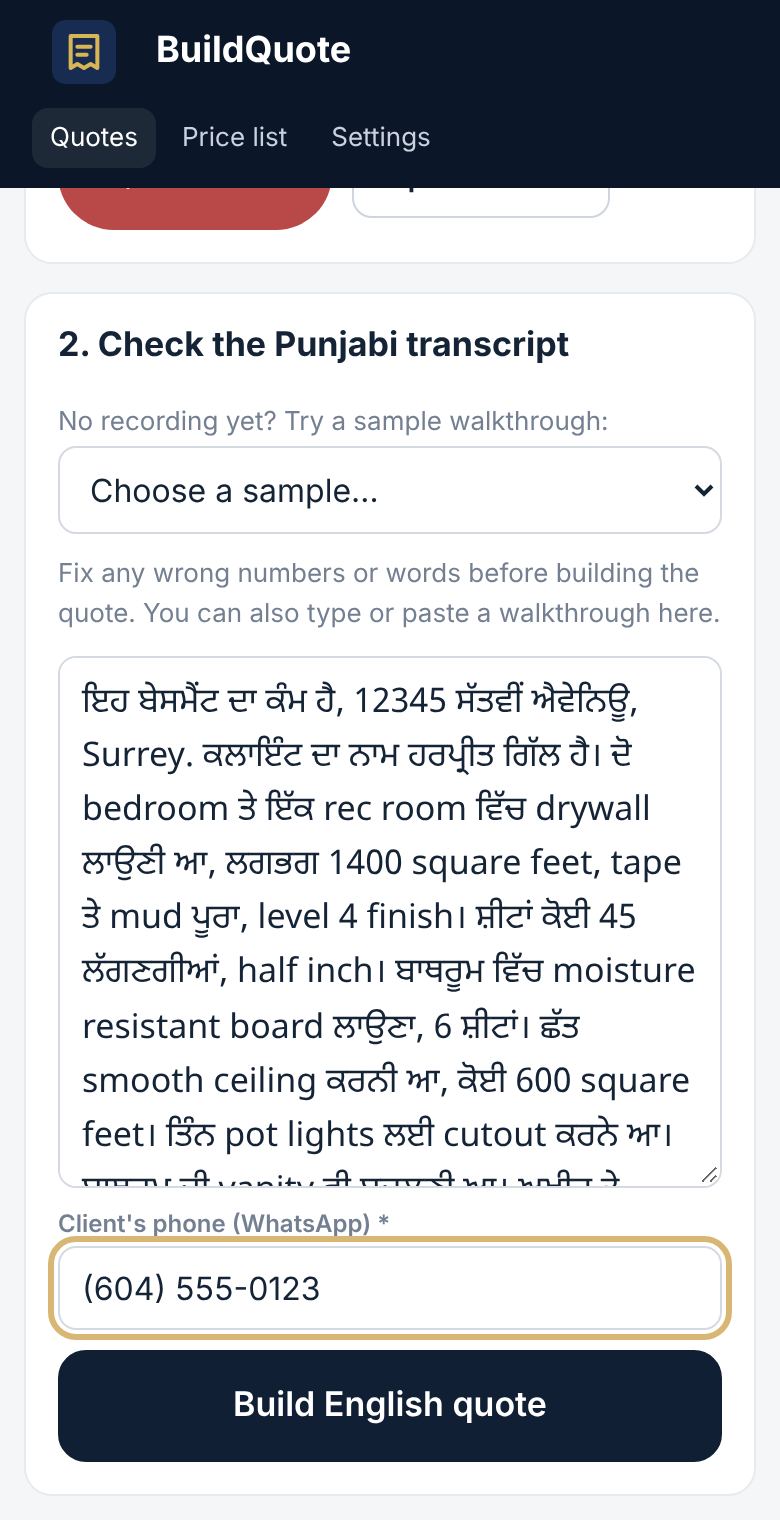
5Check the words, add the phone, build the quote
Read the transcript. Fix any wrong number or word right in the box. Enter the client's phone number (needed for WhatsApp), then tap Build English quote.
ਲਿਖਤ ਚੈੱਕ ਕਰੋ, ਫ਼ੋਨ ਨੰਬਰ ਪਾਓ, ਕੋਟ ਬਣਾਓ
ਪੰਜਾਬੀ ਲਿਖਤ ਪੜ੍ਹੋ। ਜੇ ਕੋਈ ਨੰਬਰ ਜਾਂ ਸ਼ਬਦ ਗ਼ਲਤ ਹੈ ਤਾਂ ਬਾਕਸ ਵਿੱਚ ਹੀ ਠੀਕ ਕਰ ਦਿਓ। ਕਲਾਇੰਟ ਦਾ ਫ਼ੋਨ ਨੰਬਰ ਪਾਓ (WhatsApp ਲਈ ਜ਼ਰੂਰੀ ਹੈ), ਫਿਰ Build English quote ਦਬਾਓ।
6Review the quote
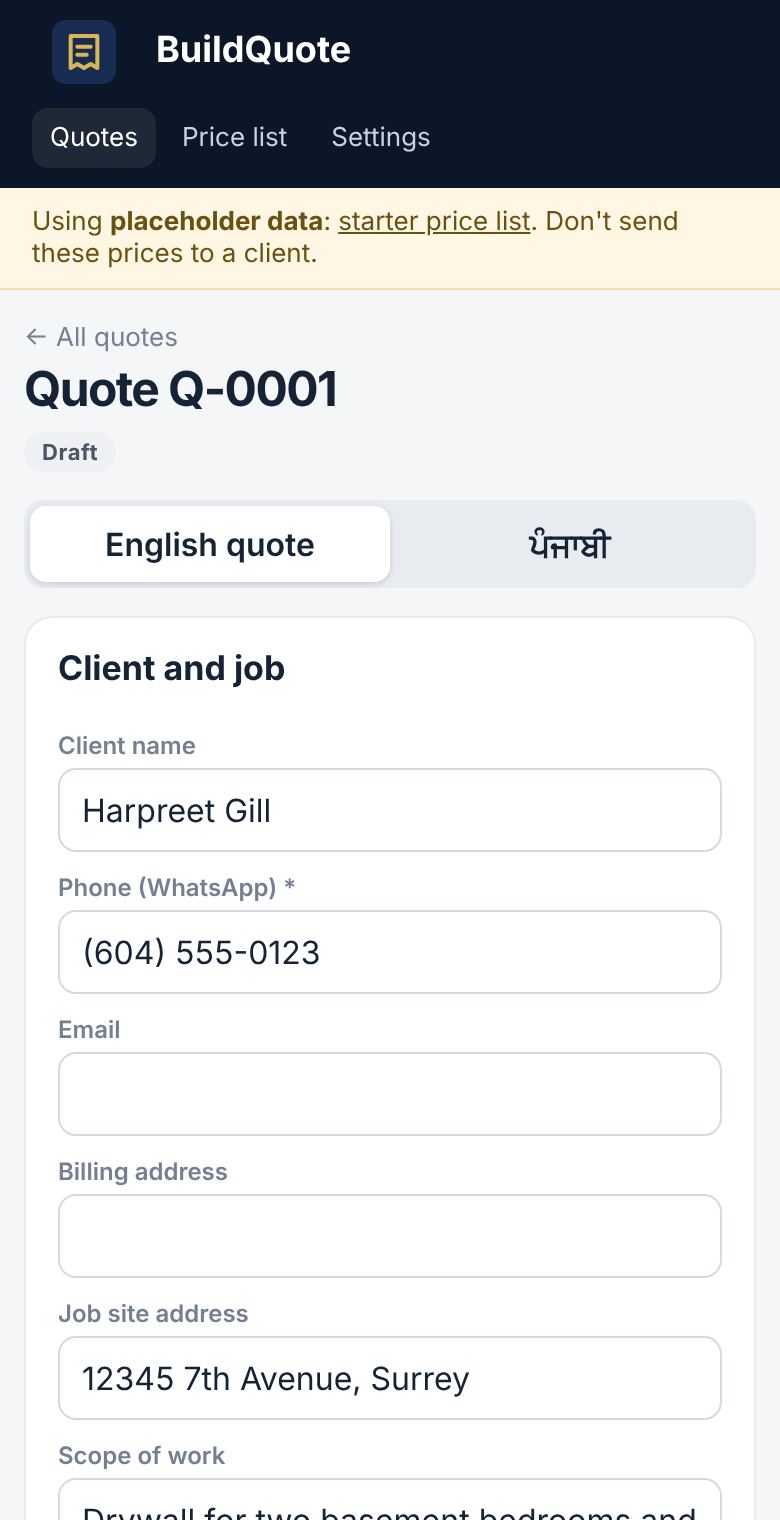
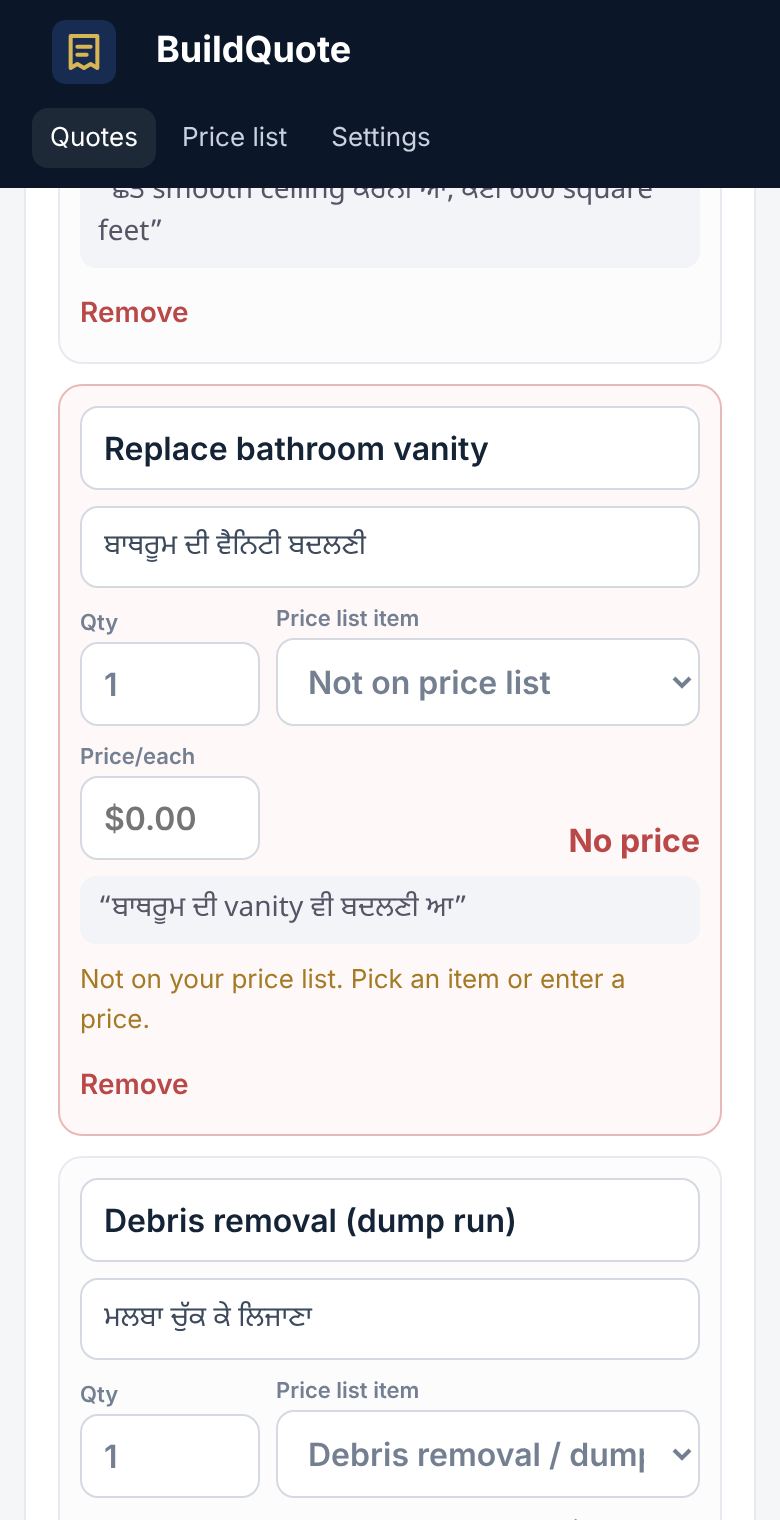
Check the client details and every line. A line marked in red has no price because it wasn't on your list: type the price, or remove the line. If you change a line the app made, you can pick a reason under "Why changed?". This helps us improve it. Tap Save changes.
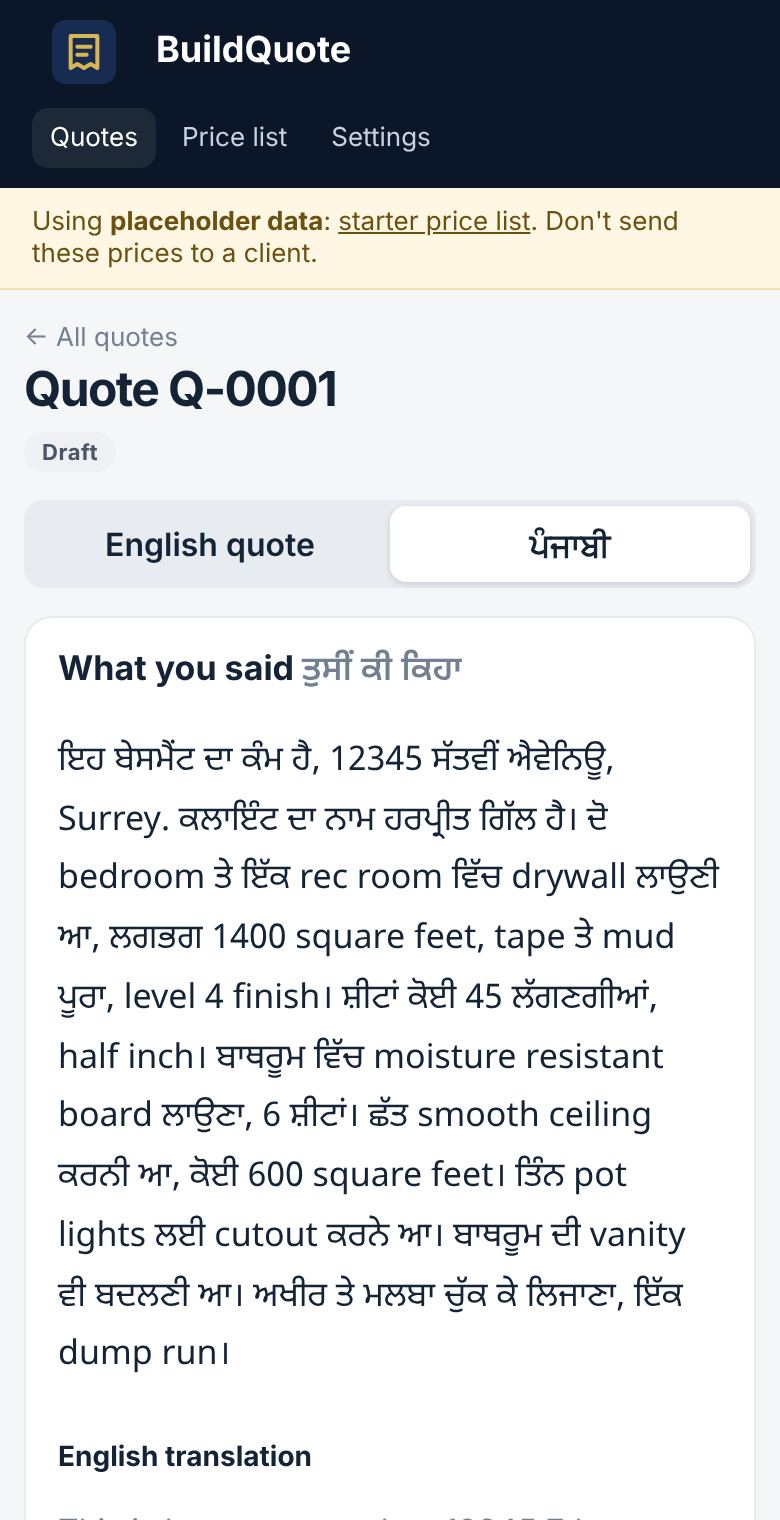
The tab with your language name (for example ਪੰਜਾਬੀ) shows your words next to each English line. On the quote, the button next to your language name (for example ਪੰਜਾਬੀ shown) puts a line in your language under each English line on the PDF. Tap it to hide them.
ਕੋਟ ਚੈੱਕ ਕਰੋ
ਕਲਾਇੰਟ ਦੀ ਜਾਣਕਾਰੀ ਅਤੇ ਹਰ ਲਾਈਨ ਵੇਖੋ। ਲਾਲ ਲਾਈਨ ਦਾ ਮਤਲਬ ਹੈ ਕਿ ਉਹ ਕੰਮ ਤੁਹਾਡੀ ਲਿਸਟ ਵਿੱਚ ਨਹੀਂ ਸੀ, ਇਸ ਲਈ ਰੇਟ ਨਹੀਂ ਲੱਗਿਆ: ਰੇਟ ਭਰੋ ਜਾਂ ਲਾਈਨ ਹਟਾ ਦਿਓ। ਜੇ ਤੁਸੀਂ ਐਪ ਦੀ ਬਣਾਈ ਲਾਈਨ ਬਦਲਦੇ ਹੋ ਤਾਂ "Why changed?" ਵਿੱਚ ਕਾਰਨ ਚੁਣ ਸਕਦੇ ਹੋ, ਇਸ ਨਾਲ ਐਪ ਸੁਧਰਦੀ ਹੈ। ਫਿਰ Save changes ਦਬਾਓ।
ਪੰਜਾਬੀ ਟੈਬ ਵਿੱਚ ਹਰ ਅੰਗਰੇਜ਼ੀ ਲਾਈਨ ਨਾਲ ਤੁਹਾਡੇ ਬੋਲੇ ਸ਼ਬਦ ਦਿਸਦੇ ਹਨ। ਪੰਜਾਬੀ shown ਬਟਨ ਨਾਲ PDF 'ਤੇ ਹਰ ਲਾਈਨ ਹੇਠਾਂ ਪੰਜਾਬੀ ਛਪਦੀ ਹੈ। ਲੁਕਾਉਣ ਲਈ ਇਸਨੂੰ ਦਬਾਓ।
7Send the quote on WhatsApp
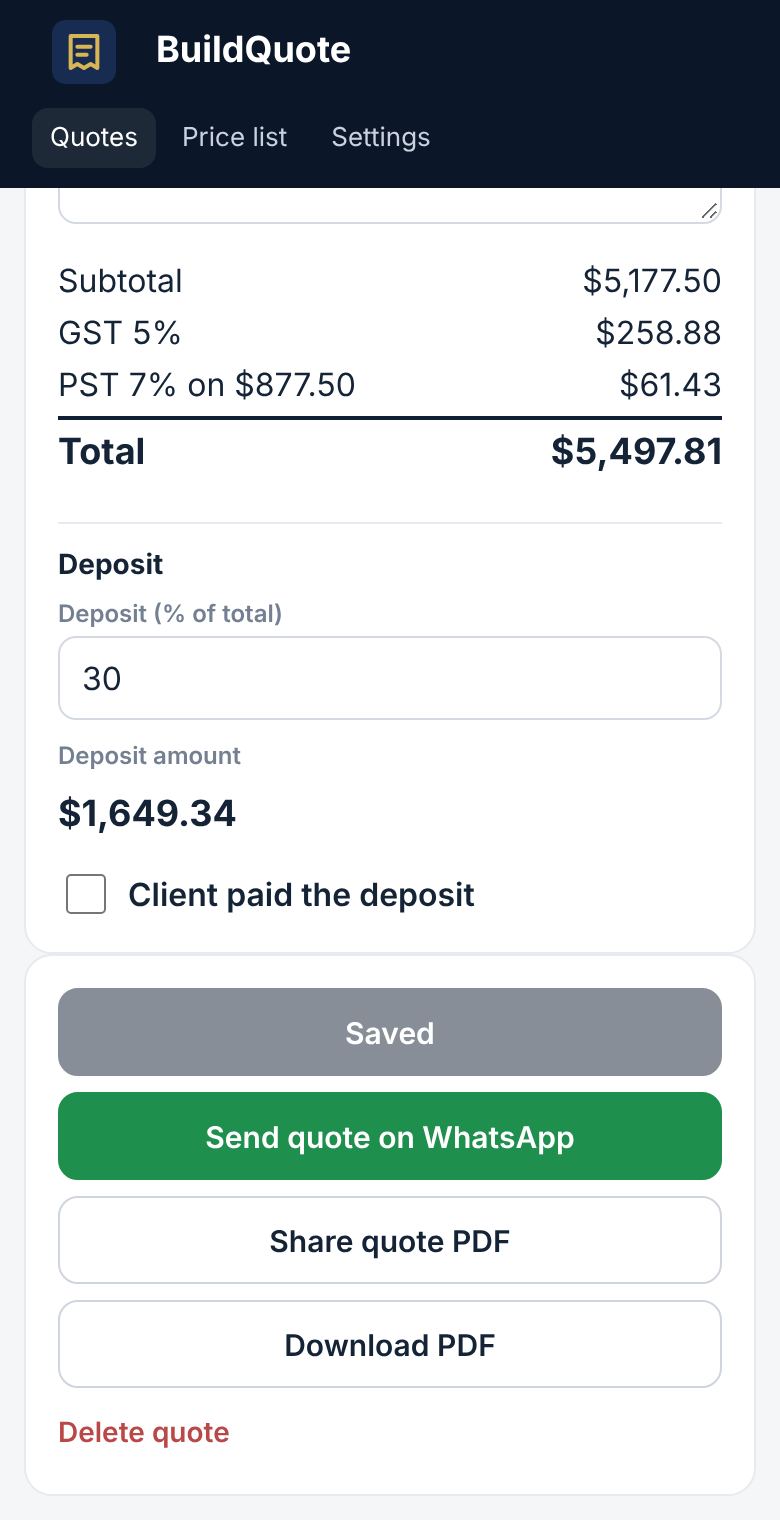
Check the deposit % and amount. Tap Send quote on WhatsApp. WhatsApp opens with the client's chat and a message with a link. Press Send in WhatsApp.
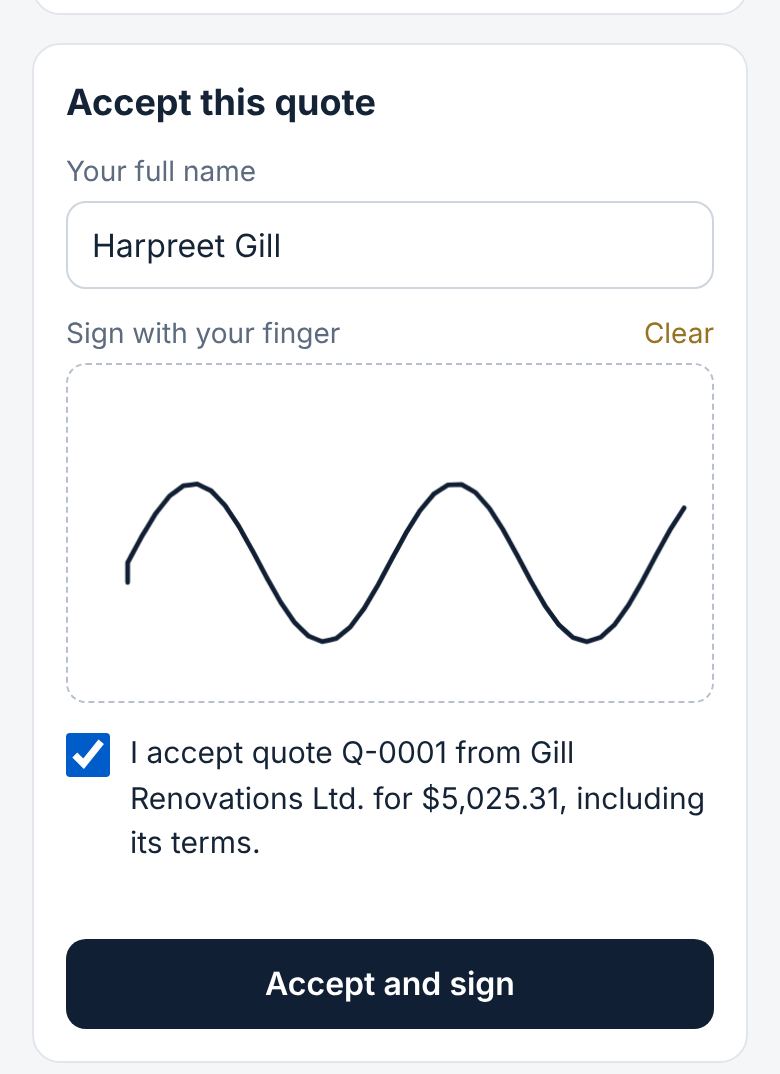
The client opens the link, sees the quote, and can accept it by typing their name and signing with a finger. No printing or scanning. You get a notification, and the client can also tap a button to tell you on WhatsApp.
ਕੋਟ WhatsApp 'ਤੇ ਭੇਜੋ
ਡਿਪਾਜ਼ਿਟ % ਅਤੇ ਰਕਮ ਚੈੱਕ ਕਰੋ। Send quote on WhatsApp ਦਬਾਓ। WhatsApp ਵਿੱਚ ਕਲਾਇੰਟ ਦੀ ਚੈਟ ਖੁੱਲ੍ਹੇਗੀ, ਲਿੰਕ ਵਾਲੇ ਮੈਸੇਜ ਸਮੇਤ। WhatsApp ਵਿੱਚ Send ਦਬਾਓ।
ਕਲਾਇੰਟ ਲਿੰਕ ਖੋਲ੍ਹ ਕੇ ਕੋਟ ਵੇਖ ਸਕਦਾ ਹੈ, ਅਤੇ ਆਪਣਾ ਨਾਮ ਲਿਖ ਕੇ ਉਂਗਲ ਨਾਲ ਦਸਤਖ਼ਤ ਕਰਕੇ ਕੋਟ ਮਨਜ਼ੂਰ ਕਰ ਸਕਦਾ ਹੈ। ਪ੍ਰਿੰਟ ਜਾਂ ਸਕੈਨ ਕਰਨ ਦੀ ਲੋੜ ਨਹੀਂ। ਤੁਹਾਨੂੰ ਫ਼ੋਨ 'ਤੇ ਸੂਚਨਾ ਆਵੇਗੀ, ਅਤੇ ਕਲਾਇੰਟ ਇੱਕ ਬਟਨ ਦਬਾ ਕੇ WhatsApp 'ਤੇ ਵੀ ਦੱਸ ਸਕਦਾ ਹੈ।
8Client signed? Make the invoice
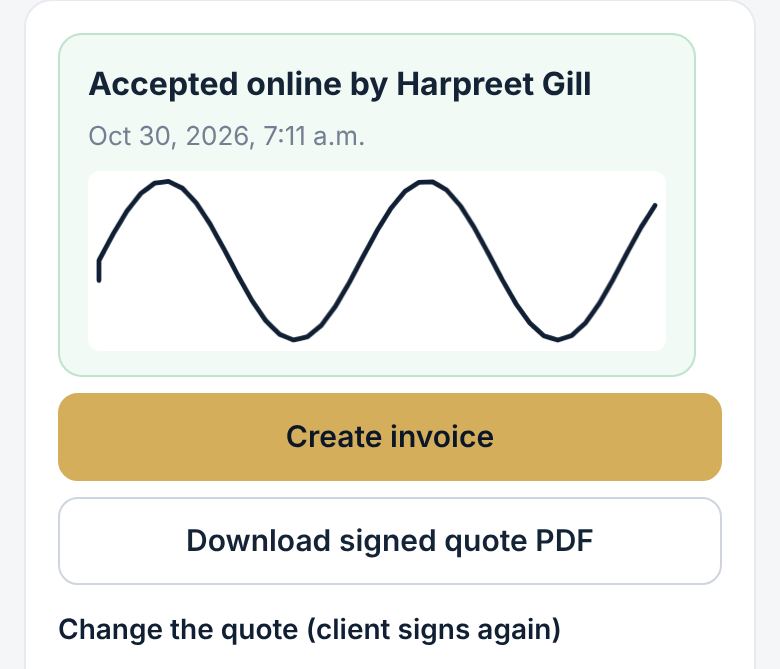
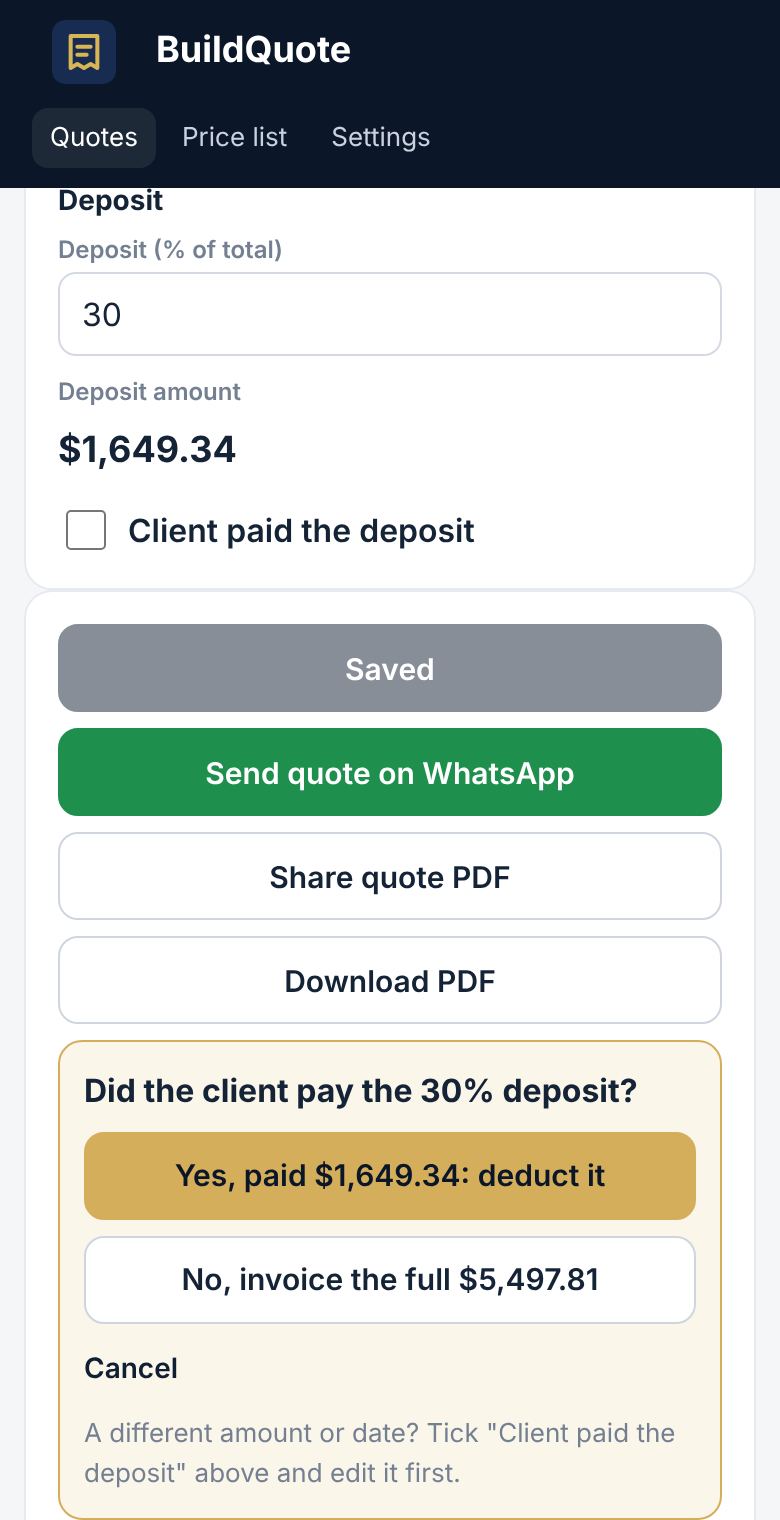
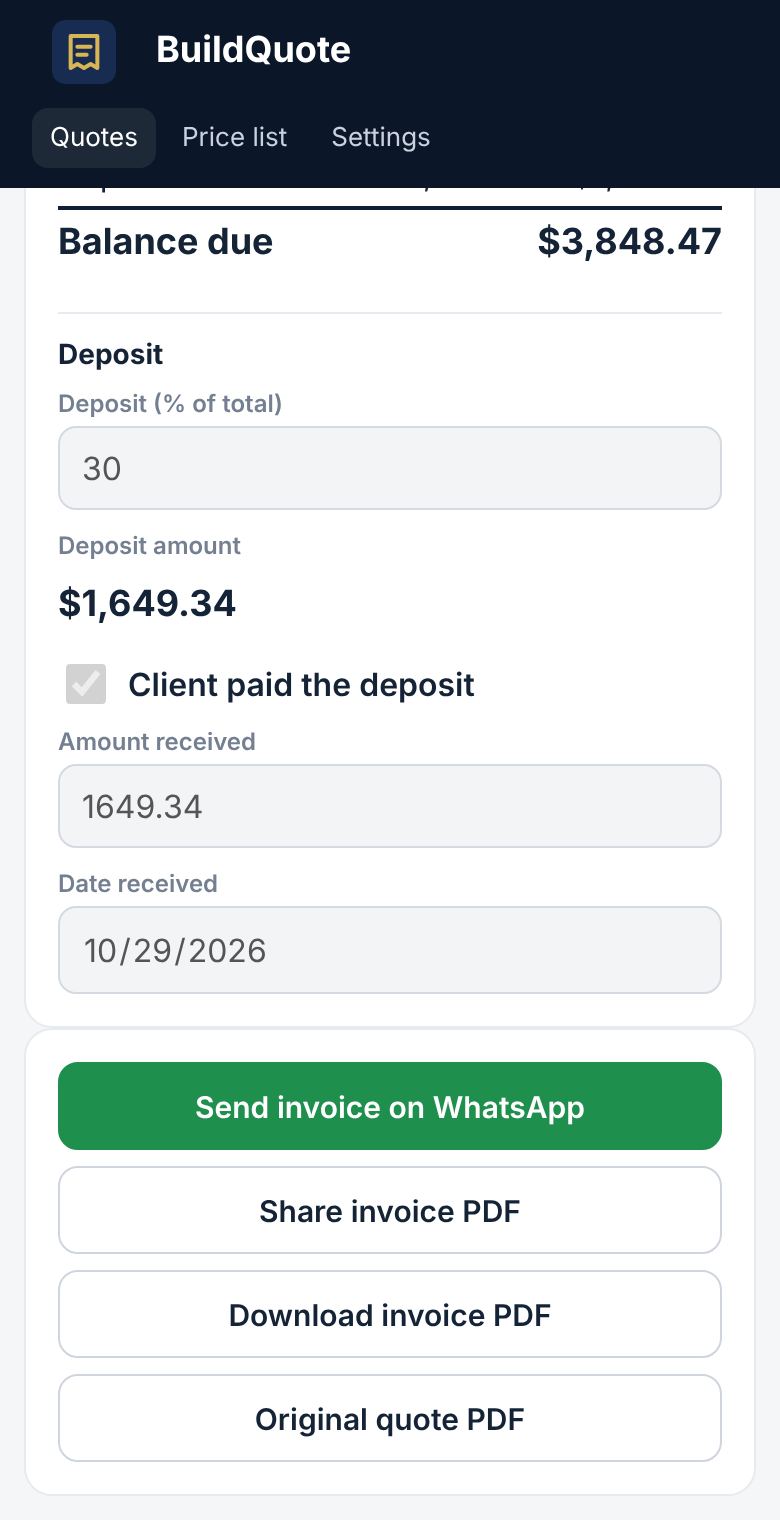
When the client signs online, the quote shows Accepted with their signature, and the signed PDF has it too. If the client says yes another way, open the quote and tap Client accepted: create invoice. For a signed quote the button is Create invoice. The app asks if the client paid the deposit. Tap Yes to take it off the invoice, or No to bill the full amount. Then tap Send invoice on WhatsApp.
ਕਲਾਇੰਟ ਨੇ ਦਸਤਖ਼ਤ ਕਰ ਦਿੱਤੇ? ਇਨਵੌਇਸ ਬਣਾਓ
ਜਦੋਂ ਕਲਾਇੰਟ ਔਨਲਾਈਨ ਦਸਤਖ਼ਤ ਕਰਦਾ ਹੈ, ਕੋਟ 'ਤੇ Accepted ਅਤੇ ਉਸਦੇ ਦਸਤਖ਼ਤ ਦਿਸਣਗੇ, ਅਤੇ PDF 'ਤੇ ਵੀ ਛਪਣਗੇ। ਜੇ ਕਲਾਇੰਟ ਕਿਸੇ ਹੋਰ ਤਰੀਕੇ ਨਾਲ ਹਾਂ ਕਹਿੰਦਾ ਹੈ, ਤਾਂ ਕੋਟ ਖੋਲ੍ਹ ਕੇ Client accepted: create invoice ਦਬਾਓ। ਦਸਤਖ਼ਤ ਵਾਲੇ ਕੋਟ 'ਤੇ ਇਹ ਬਟਨ Create invoice ਹੁੰਦਾ ਹੈ। ਐਪ ਪੁੱਛੇਗੀ ਕਿ ਕਲਾਇੰਟ ਨੇ ਡਿਪਾਜ਼ਿਟ ਦਿੱਤਾ ਜਾਂ ਨਹੀਂ। Yes ਦਬਾਓਗੇ ਤਾਂ ਡਿਪਾਜ਼ਿਟ ਇਨਵੌਇਸ ਵਿੱਚੋਂ ਘਟ ਜਾਵੇਗਾ, No ਦਬਾਓਗੇ ਤਾਂ ਪੂਰੀ ਰਕਮ ਦਾ ਬਿੱਲ ਬਣੇਗਾ। ਫਿਰ Send invoice on WhatsApp ਦਬਾਓ।
✓Tips for testers
- Price: free until December 1, 2026. After that you pick a plan: Basic $40, Standard $60 or Premium $90 per month, paid by Interac e-Transfer or credit card (card payments are coming by then). Pay for a year and get 2 months free. The Pilot Crew, the first 100 testers who send at least 3 quotes before then, pay $25/month for life on any plan, and get $5 off a month for 3 months for every tradesperson they refer who pays. See Settings → Plan and billing.
- Use it on real jobs, at least one a week. Short, clear recordings work best.
- Say numbers clearly, and say the unit: square feet, each, hours.
- Keep the phone close and away from loud tools while you talk.
- Something wrong or confusing? Send a screenshot to Akaal Automation Systems on WhatsApp (778) 852-0350 or email [email protected].
ਟੈਸਟ ਕਰਨ ਵਾਲਿਆਂ ਲਈ ਸੁਝਾਅ
- ਕੀਮਤ: 1 ਦਸੰਬਰ 2026 ਤੱਕ ਮੁਫ਼ਤ। ਉਸ ਤੋਂ ਬਾਅਦ ਤੁਸੀਂ ਇੱਕ ਪਲੈਨ ਚੁਣੋਗੇ: Basic $40, Standard $60 ਜਾਂ Premium $90 ਮਹੀਨਾ, Interac e-Transfer ਜਾਂ ਕ੍ਰੈਡਿਟ ਕਾਰਡ ਰਾਹੀਂ (ਕਾਰਡ ਭੁਗਤਾਨ ਉਦੋਂ ਤੱਕ ਆ ਜਾਣਗੇ)। ਸਾਲ ਦਾ ਇਕੱਠਾ ਦੇਣ 'ਤੇ 2 ਮਹੀਨੇ ਮੁਫ਼ਤ। Pilot Crew, ਯਾਨੀ ਪਹਿਲੇ 100 ਟੈਸਟਰ ਜਿਨ੍ਹਾਂ ਨੇ ਉਸ ਤੋਂ ਪਹਿਲਾਂ ਘੱਟੋ-ਘੱਟ 3 ਕੋਟ ਭੇਜੇ, ਕਿਸੇ ਵੀ ਪਲੈਨ 'ਤੇ ਸਾਰੀ ਉਮਰ $25 ਮਹੀਨਾ ਦੇਣਗੇ, ਅਤੇ ਹਰ ਉਸ ਕਾਰੀਗਰ ਲਈ ਜਿਸਨੂੰ ਉਹ ਜੋੜਦੇ ਹਨ ਅਤੇ ਜੋ ਪੈਸੇ ਦਿੰਦਾ ਹੈ, 3 ਮਹੀਨਿਆਂ ਲਈ ਹਰ ਮਹੀਨੇ $5 ਦੀ ਛੋਟ ਮਿਲੇਗੀ। Settings → Plan and billing ਵੇਖੋ।
- ਅਸਲ ਕੰਮਾਂ 'ਤੇ ਵਰਤੋ, ਘੱਟੋ-ਘੱਟ ਹਫ਼ਤੇ ਵਿੱਚ ਇੱਕ ਵਾਰ। ਛੋਟੀ ਅਤੇ ਸਾਫ਼ ਰਿਕਾਰਡਿੰਗ ਸਭ ਤੋਂ ਵਧੀਆ ਕੰਮ ਕਰਦੀ ਹੈ।
- ਨੰਬਰ ਸਾਫ਼ ਬੋਲੋ ਅਤੇ ਨਾਲ ਇਕਾਈ ਦੱਸੋ: ਸਕੁਏਅਰ ਫੁੱਟ, ਨਗ (each), ਘੰਟੇ।
- ਬੋਲਦੇ ਸਮੇਂ ਫ਼ੋਨ ਨੇੜੇ ਰੱਖੋ ਅਤੇ ਉੱਚੀ ਆਵਾਜ਼ ਵਾਲੇ ਟੂਲਾਂ ਤੋਂ ਦੂਰ ਰਹੋ।
- ਕੁਝ ਗ਼ਲਤ ਜਾਂ ਸਮਝ ਨਹੀਂ ਆਇਆ? Akaal Automation Systems ਨੂੰ WhatsApp (778) 852-0350 'ਤੇ ਸਕਰੀਨਸ਼ਾਟ ਭੇਜੋ, ਜਾਂ [email protected] 'ਤੇ ਈਮੇਲ ਕਰੋ।